
20 minutes copying orders from Zalo chats into Excel. 15 minutes reopening an old quote, retyping it and fixing the customer's name. 15 minutes messaging customers one by one about payments and delivery dates. Another 10 chasing the warehouse and accounts to find out where an order has got to, then reporting back. That's a tidy 60 minutes a day for one salesperson (illustrative example), and not a single one of them is spent selling.
Scale it to a team of five over roughly 22 working days: 5 people × 1 hour × 22 days ≈ 110 hours a month. That's more than half of one employee's month, poured into work software could be doing.
Your team may do more manual work than that, or less, so the only figure worth trusting is the one you work out yourself:
(number of salespeople) × (minutes of manual work per day ÷ 60) × 22 days = ____ hours a month
The easiest way to get the minutes is to ask your team: "Yesterday, how long did you spend copying, retyping and chasing?" The real figure is usually higher than anyone guesses, because nobody times the jobs that "only take a sec".
Sales process automation hands that repetitive load to software: data entry, assigning leads to reps, reminders, and scripted emails or messages. Your people keep the part that genuinely needs a human, which is listening, advising and negotiating. HubSpot describes the goal as removing repetitive manual tasks so reps can focus on selling. For a small business, knowing what the software can do is the easy bit. The hard bit is choosing what to automate first, and knowing when to stop.
Automation can't replace a good process
A mooncake packing line has just installed a conveyor belt running twice as fast. If the people boxing the cakes were already mixing up the flavours, the new belt simply gives you twice as many wrongly packed boxes per hour. Automation works the same way: it amplifies whatever you already have. Automate a messy process and you get a faster mess.
That's why practical guides keep telling you to map the current process before bringing in any tool. A sensible starting point is our piece on business process optimization, plus a simple home for customer data like the one in CRM for small businesses. For a guided route, there's also our training series Optimizing SME Sales with AI.
Machines help you do faster what you already do. They can't tell you what's worth doing.
What to automate
Material from HubSpot, Apollo and VanillaSoft points to the same group of tasks: anything rule-based and frequently repeated. Think of them as your sales team's housework. All of it needs doing, and none of it needs a great salesperson's powers of persuasion.
| Task | How it is automated | Main value |
|---|---|---|
| Lead routing | By region, industry or deal size, leads are assigned automatically to the right rep | Faster response, nothing missed |
| Task and meeting reminders | Auto-create a task when a deal changes stage or after N days without a reply | Consistent follow-up |
| CRM data updates | Emails, calls and meetings are logged automatically | Cleaner data, less typing |
| Thank-you and confirmation messages | Sent right after a prospect leaves their details | The prospect feels acknowledged |
| Nurture sequences | Scripted, helpful content for prospects not ready to buy | Long-term contact |
| Regular reports | A weekly pipeline summary, compiled automatically | Saves time, faster decisions |
| Renewal and after-sales reminders | Triggered by contract dates | Customer retention |
How many of those seven rows does your team still do entirely by hand, and which one eats the most hours? The answer to the second question is your first automation.
What not to automate, or what to keep behind a human review
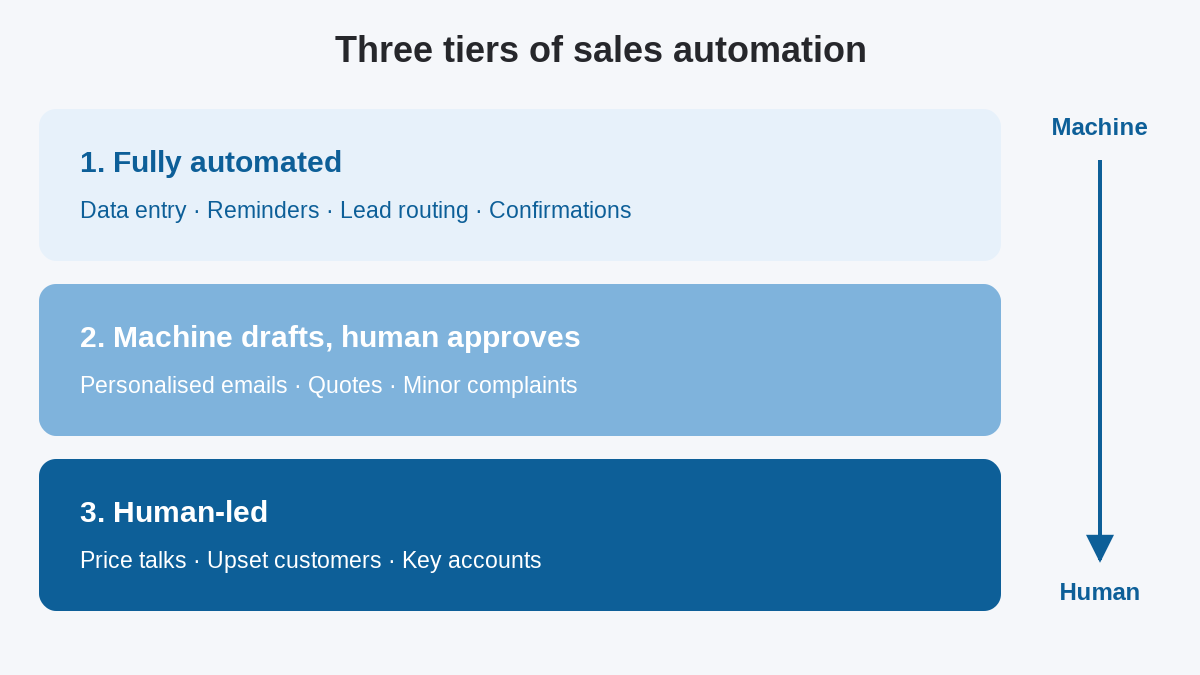
Close and Apollo both draw a clear line between work that can be fully automated and work that needs a human review or a human in charge. Think of the coffee machine in your office. It turns out a decent morning cup day after day, yet when an important partner visits, the owner usually brews a pot of tea and pours it personally. We suggest splitting the work into three tiers:
- Fully automated: data entry, reminders, lead assignment, and acknowledging received enquiries.
- Automated with review: personalised outreach emails, quotations and replies to minor complaints. The system drafts, a person reads it, then it goes out.
- Human-led: price negotiation, upset customers, key accounts, and any conversation that needs empathy and judgment.
A common mistake is blasting out generic messages that make prospects feel they've been dropped onto an assembly line. Software can't read tone or trust, and those matter a great deal in Vietnamese B2B selling, where personal relationships carry real weight. An automated birthday message that lands at exactly midnight, word for word the same as three hundred others, may well make a customer remember you, just not in the way you hoped.
Drop each of the seven tasks from the earlier table into one of these tiers and you have a first draft of your automation plan. Whatever lands in tier three, keep it proudly human.
Five steps, starting from one bottleneck
Automation is a lot like a morning exercise routine. The person who schedules ten workouts in the first week usually quits before the one who does a single exercise every day. So take small steps:
- Map how customers move through your business today. From the moment they first hear of you to the finished purchase, list each step and who does it.
- Pick one or two points that eat the most time or are easiest to miss. For example, a prospect leaves their details and nobody calls back for two days.
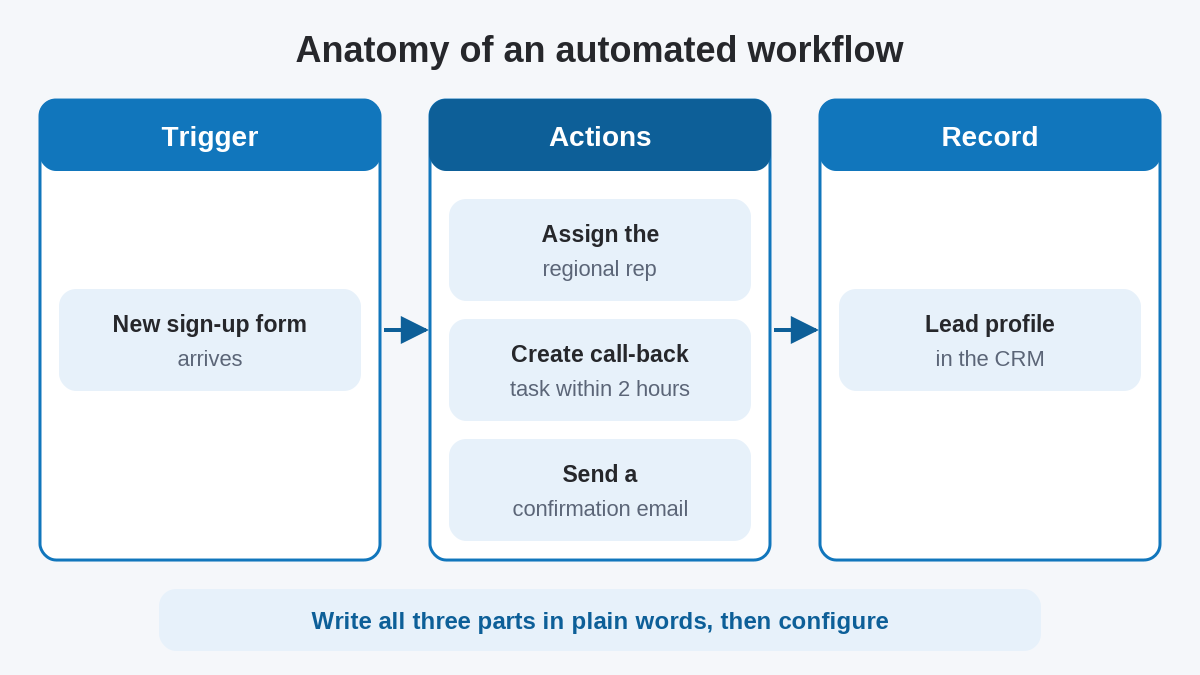
- Write the rule in plain words before configuring anything. For instance: "When a new sign-up form arrives, assign the lead to the regional rep, create a call-back task due within two hours, and send the prospect a confirmation email."
- Pilot with a small group for two to four weeks, measuring response time and conversion against the period before.
- Expand gradually and review every quarter. Switch off any automation that no longer earns its place.
The tools don't need to be complicated. Many CRM systems already include workflows built from three parts: a trigger, actions, and the records those actions work on. Advanced features, however, often sit in higher-priced plans, so check your plan before you commit. If you sell on several platforms, take a look at building an omnichannel sales system.
Before you sit through another software demo, write one rule in the step 3 format for your team's biggest bottleneck. One clear sentence on paper is worth more than ten software demos.
Legal points on messages and customer data
This is the part most easily forgotten when automating, because machines send messages in seconds while the fallout from a badly aimed batch can linger for months.
- Advertising messages, emails and calls. According to the Government Official Gazette, Decree 91/2020/ND-CP on combating spam messages, spam emails and spam calls has been in force since 1 October 2020. Its general principle is to send marketing communications only with the recipient's prior consent. The decree also covers permitted sending hours and a do-not-advertise list. The Ministry of Public Security portal has published a draft decree to replace it, with a comparison table (September 2026). At the time of writing we found no replacement issued, so check the version currently in force.
- Personal data. According to the Government Official Gazette, the Law on Personal Data Protection No. 91/2025/QH15 took effect on 1 January 2026. Its Article 4 recognises data subjects' rights, including being informed about processing, consenting or refusing, and withdrawing consent. When you build automated flows, include a clear way to collect consent, record when it was given, and give customers an easy way to opt out.
Day to day, good practice means stating the purpose when you collect data, including an unsubscribe option in every message, keeping only the data you need, and limiting who can access it.
Note: The legal information in this article is a summary based on the Kingsley Asia team's analysis of documents and sources published at the time of writing (11/2026). Policies may change; please confirm with a lawyer or accountant before acting on it.
How Kingsley Asia can help
When we work with a sales team, we start with the sum at the top of this page: how many hours a month go on manual work, which tier each task belongs in, how much automation is just enough, and which few metrics will show whether it paid off, with consent collection set up the way Vietnamese law expects. Our Sales & Marketing Excellence page lists everything we do for sales teams. Want to run the numbers for your own team? Drop us a line.
Sources
- HubSpot, What is sales automation
- Close, To Automate or Not? How to Automate the Sales Process, Not the Relationship
- Apollo, What Tasks Can Be Fully Automated in a Sales Platform
- VanillaSoft, How to automate sales workflows
- Vietnam Official Gazette – Decree 91/2020/ND-CP on combating spam messages, spam emails and spam calls (2020)
- Ministry of Public Security – Comparison table for the draft decree replacing Decree 91/2020/ND-CP (2026)
- Vietnam Official Gazette – Law No. 91/2025/QH15 on Personal Data Protection (2025)

Kingsley Asia
The Kingsley Asia consulting team – helping Vietnamese SMEs and international investors from strategy to execution.